Set up Google Cloud Pub/Sub so replies to your outreach reach AgentSDR within moments and stop the sequence.
Sending email works as soon as Google Workspace is connected. Replies do not arrive until you also set up Pub/Sub. AgentSDR only learns about new mail when Gmail pushes a notification to it, so without this page, replies are not picked up and a sequence keeps going after someone answers.
What you need
Google Workspace already connected, with the same Google Cloud project.
Permission to create Pub/Sub topics and edit their access in that project.
A public HTTPS address for your AgentSDR (your BETTER_AUTH_URL) with a valid certificate. A localhost install cannot receive pushes.
Ability to schedule one daily call to AgentSDR (Production setup).
Gmail does not call you when mail arrives, unless you ask it to. AgentSDR asks Gmail to “watch” each connected mailbox’s inbox and publish to a Pub/Sub topic. A push subscription forwards each notification to AgentSDR, which fetches the new messages, matches them to the lead and moves the conversation along in the CRM.A Gmail watch expires after about seven days. Google’s documentation says to call watch at least every 7 days and recommends once a day. AgentSDR does this when you call its renewal endpoint, so you schedule that endpoint daily (step 5).
1
Create a topic
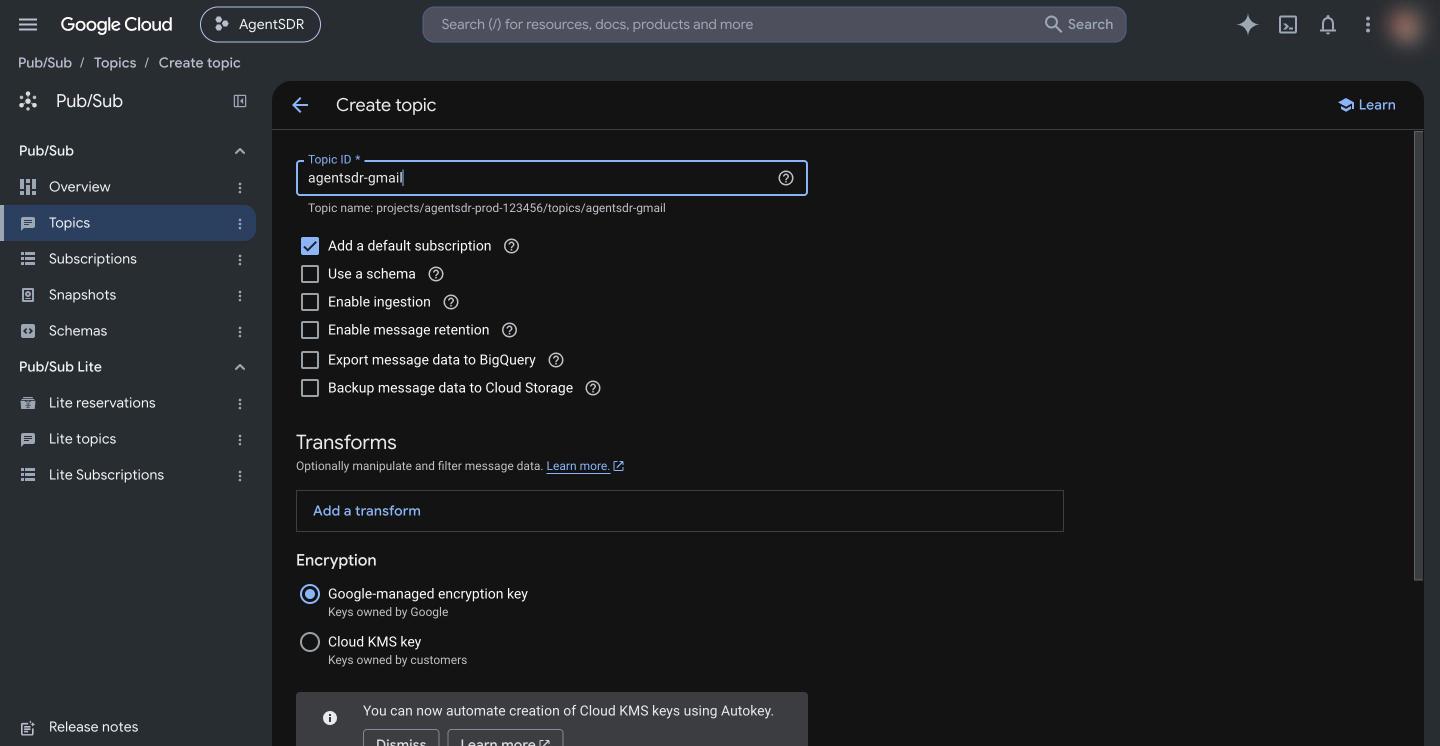
In the Google Cloud console pick the same project you used for Workspace, open Pub/Sub → Topics and click Create topic. Enter a Topic ID such as agentsdr-gmail. You can untick Add a default subscription, because you create a push subscription in step 4. Click Create topic.The topic’s full name is projects/<project-id>/topics/<topic-id>, for example projects/my-project/topics/agentsdr-gmail. You can copy it from the topic page.
The full topic name under the field is what AgentSDR asks for.
2
Let Gmail publish to the topic
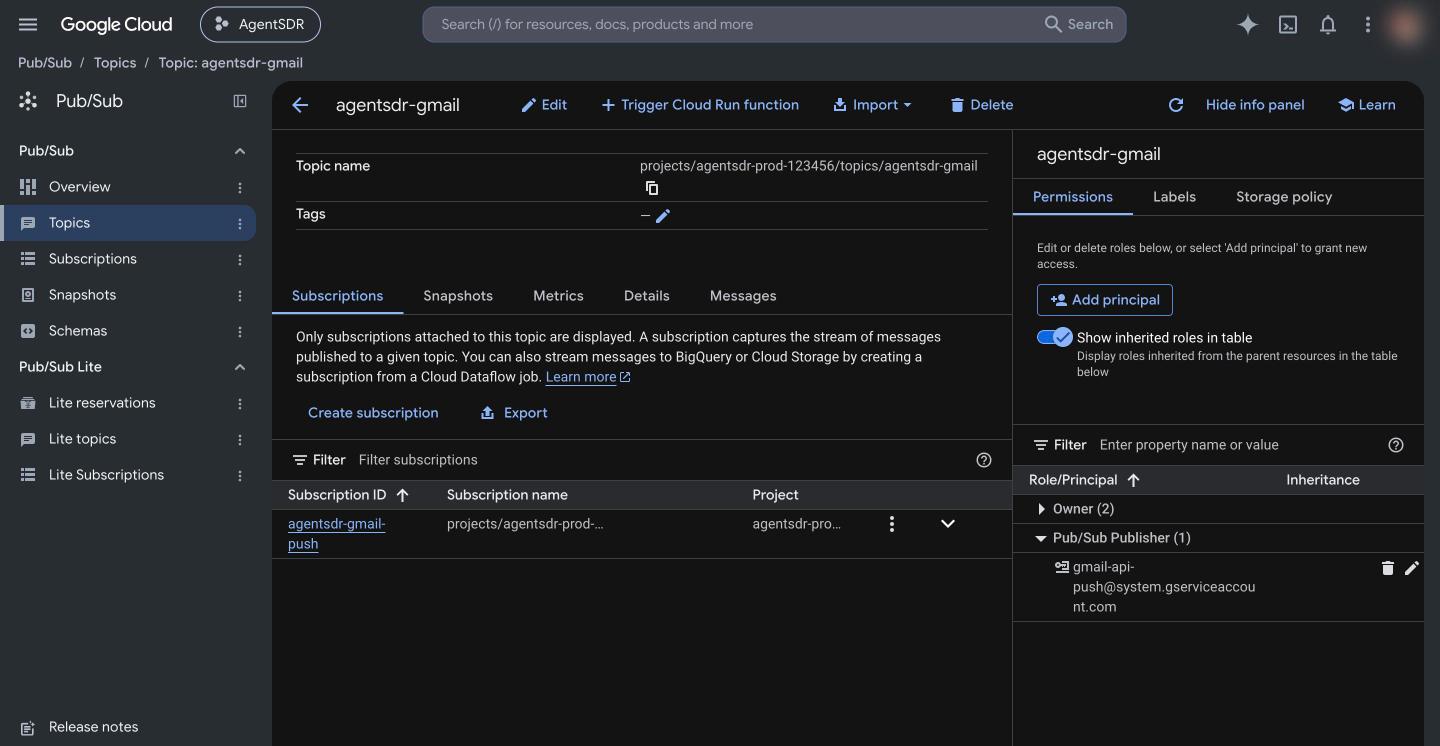
Open the topic, show the Permissions panel (the info panel on the right, or the Permissions tab), click Add principal and enter:
Choose the role Pub/Sub Publisher and save. This is a Google-owned account; it is how Gmail is allowed to write notifications to your topic. Without it, registering a watch fails.
When the grant is in place, the topic Permissions panel lists the Gmail push account under Pub/Sub Publisher.
3
Save the topic name in AgentSDR
Open Settings → Email → Connection, click Edit on the Google Workspace card and paste the full name into Gmail Pub/Sub topic, for example projects/my-project/topics/agentsdr-gmail. Leave Private key blank to keep the saved key. Click Save. AgentSDR refuses a value that does not match projects/<project>/topics/<topic>.
4
Create a push subscription
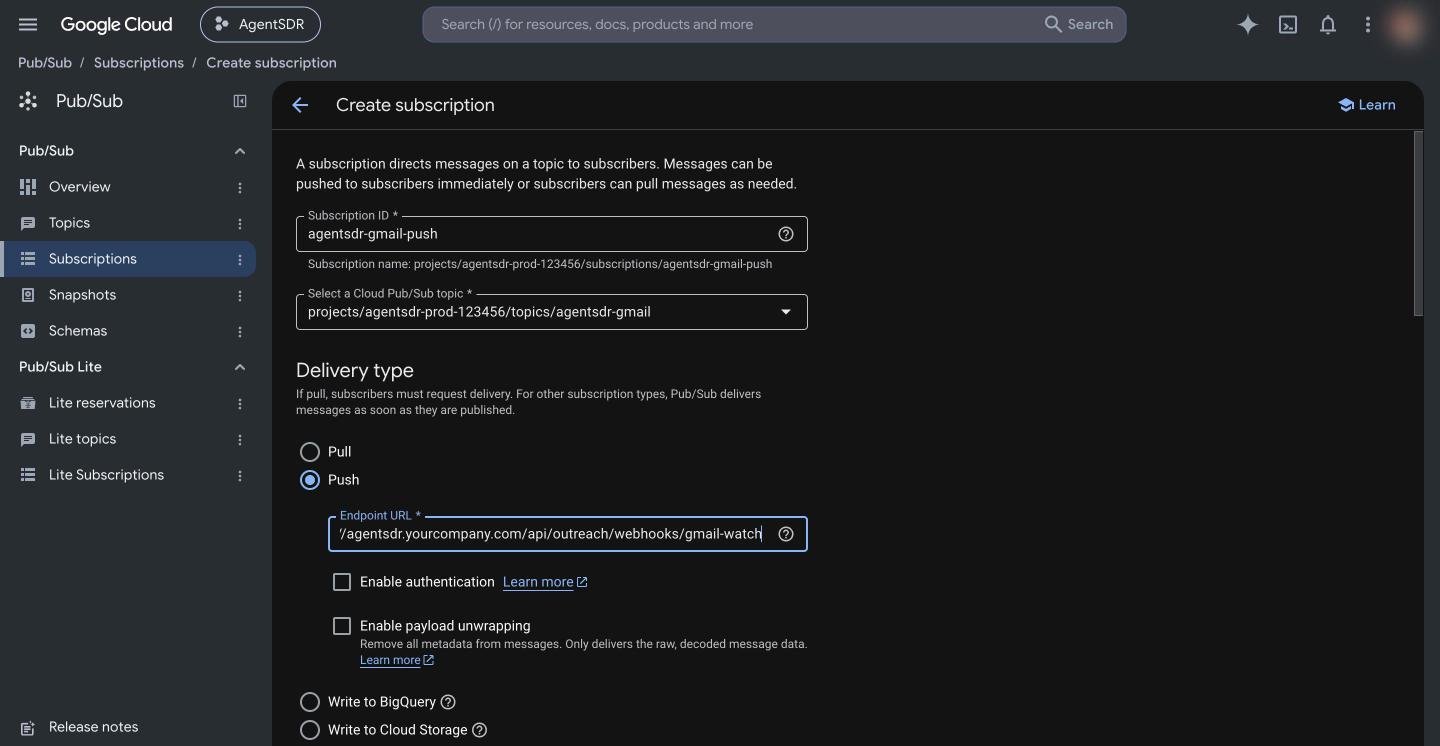
Open Pub/Sub → Subscriptions and click Create subscription. Enter a Subscription ID (for example agentsdr-gmail-push), select your topic, and set Delivery type to Push. In Endpoint URL enter:
Replace <your-domain> with your public address (the same host as BETTER_AUTH_URL). Google requires a publicly reachable HTTPS endpoint with a certificate from a certificate authority. Leave the other options at their defaults and click Create.There is no secret to add. Pub/Sub push cannot carry one, so the endpoint only acts on addresses that are connected mailboxes in AgentSDR and acknowledges everything else. See Pub/Sub push docs.
Choose Push and paste your AgentSDR gmail-watch endpoint.
5
Schedule the daily watch renewal and run it once
AgentSDR registers the watches when this endpoint is called, not when you add a mailbox. Call it once now, then every day:
curl -fsS -X POST -H "x-tick-secret: $OUTREACH_TICK_SECRET" "https://<your-domain>/api/outreach/mailboxes/watch"
The secret is your OUTREACH_TICK_SECRET (sent as the x-tick-secret header or ?secret=). Without it the endpoint answers 401. The reply lists each mailbox with ok: true, or an error. Organizations that have no topic saved are listed under skipped with gmail_watch_topic_not_configured. How to schedule it with cron or your host’s scheduler is in Production setup.
Gmail pub/sub topic must look like projects/<project>/topics/<topic>
The field holds something else, such as just the topic name. Use the full name from the topic page.
Watch result shows an error mentioning the topic or User not authorized
Gmail could not publish to your topic. Check step 2: the principal [email protected] must have Pub/Sub Publisher on that exact topic, and the topic must be in the project named in the field.
skipped: gmail_watch_topic_not_configured
No topic is saved on the Google Workspace card. Do step 3.
skipped: google_not_connected
Google Workspace is not connected for that organization. See Google Workspace.
401 unauthorized from the watch endpoint
OUTREACH_TICK_SECRET is unset, or the value you sent differs. It is set in your environment, see Configuration.
Replies worked, then stopped after about a week
The watch expired because the daily job is not running. Schedule step 5 and run it once by hand.
Pub/Sub shows delivery errors or a growing backlog
The endpoint is not reachable over HTTPS, the certificate is invalid, or a firewall blocks Google. Open the URL path from outside your network; a POST should answer 200. Note that AgentSDR answers 200 even for pushes it ignores, so only unreachable endpoints cause retries.