Connect Unipile so AgentSDR can use LinkedIn and WhatsApp: get your DSN and access token, connect, link accounts and check webhooks.
Unipile is the service AgentSDR uses to reach LinkedIn and WhatsApp. You connect it once per organization. Without it, LinkedIn accounts and campaigns and WhatsApp messaging and calling are off.
What you need
A Unipile account (dashboard.unipile.com). Unipile is a paid service billed by Unipile directly. AgentSDR does not charge for it and this page lists no prices: check Unipile’s own pricing.
The owner or admin role in AgentSDR.
Your AgentSDR running at a public address (BETTER_AUTH_URL) if you want webhooks registered automatically.
LinkedIn: connection invitations, messages, search and inbox sync. See LinkedIn accounts.
WhatsApp: messaging, the Numbers list and calling. See WhatsApp numbers.
Webhooks: Unipile tells AgentSDR when an invitation is accepted or a message arrives.
LinkedIn and WhatsApp use the same Unipile connection. You can open it from Settings → LinkedIn → Connection or from Settings → WhatsApp → Integrations. Each page notes that changing it in one place changes it in the other.
The dashboard shows your DSN, the address of your Unipile API, for example api8.unipile.com:13851. Copy it as it appears. You can leave off https://: AgentSDR adds it.
3
Generate an access token
Open Access tokens in the dashboard and generate a token. Copy it now: Unipile shows it only once.
4
Open the Connection page in AgentSDR
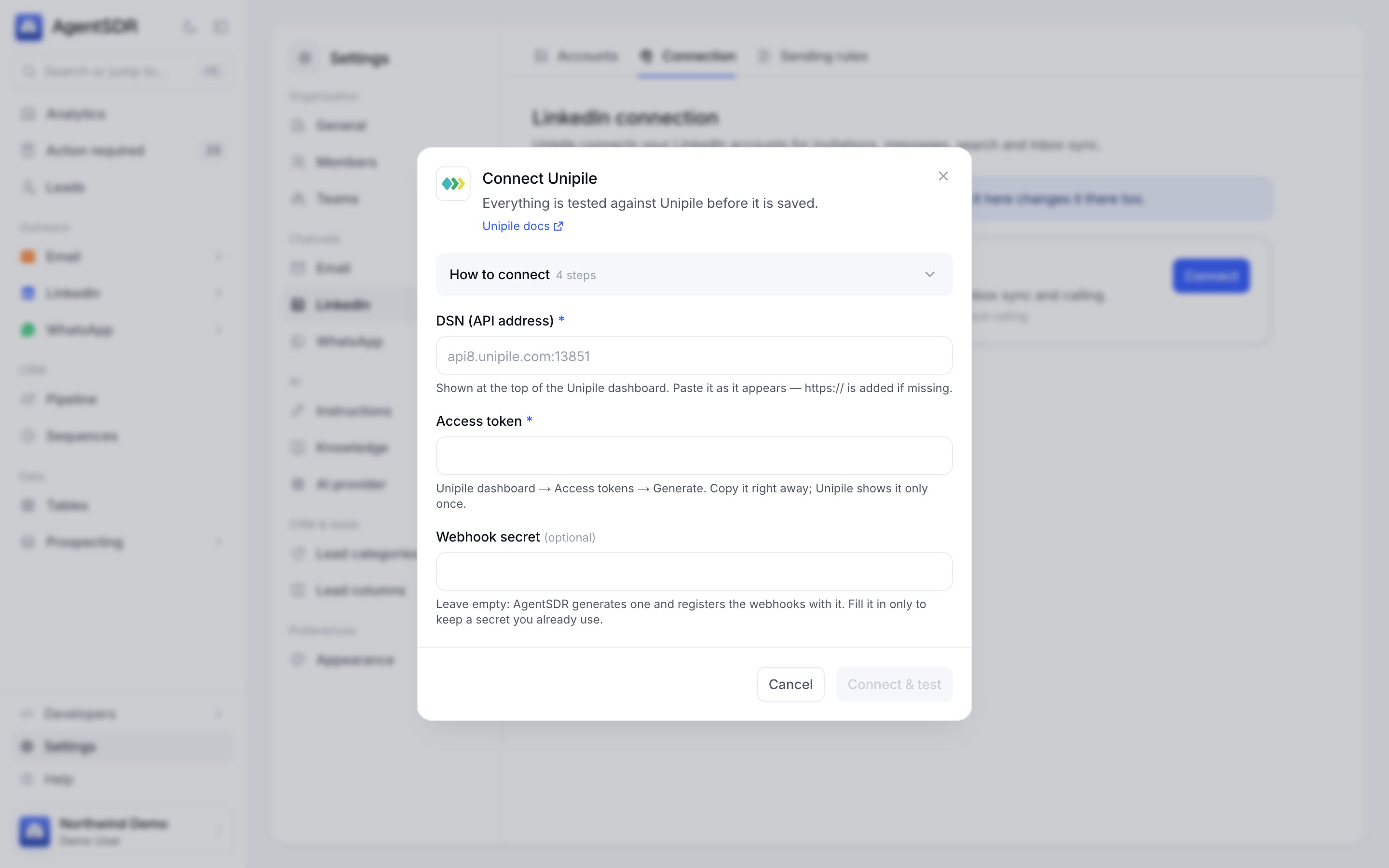
Go to Settings → LinkedIn → Connection (or Settings → WhatsApp → Integrations). The Unipile card shows Not connected. Click Connect. Open How to connect in the dialog for the same steps in short form.
Three fields, then Connect and test.
5
Fill in the fields
Field
What to enter
DSN (API address)
The DSN from step 2.
Access token
The token from step 3.
Webhook secret
Leave it empty. AgentSDR generates one on the first save. Fill it in only to keep a secret you already use.
6
Click Connect & test
The button shows Testing… while AgentSDR calls Unipile once to check the DSN and token. If the check passes, the integration is saved (when editing later, the button reads Save) and the card shows Connected with a Last verified time.
Live verification. AgentSDR asks Unipile for one account (GET /api/v1/accounts?limit=1) with your token. A wrong DSN or token fails here and nothing is saved.
Webhook registration. AgentSDR registers the webhooks it needs in your Unipile workspace through Unipile’s API, so you do not set anything up in the Unipile dashboard. Registration replaces earlier ones and never duplicates. It is skipped on a localhost address, because Unipile’s servers cannot reach it. Run AgentSDR at its public address and click Register again, or save again, to register.
The card’s Webhooks line shows a badge: 2 registered (green), Registration failed, Not registered (skipped, for example on a local address) or Not registered yet, with Register again and Show URLs and secret (owners and admins). The URLs, the secret and how deliveries are checked are in the Webhooks reference.
Connecting Unipile gives AgentSDR access to your Unipile workspace. You then link the actual LinkedIn profiles and WhatsApp numbers.
LinkedIn
WhatsApp
Go to Settings → LinkedIn → Accounts and click Connect LinkedIn account.
You are sent to Unipile’s hosted sign-in. Sign in to LinkedIn there and finish any verification. AgentSDR never sees your LinkedIn password. The link is single-use and short-lived (15 minutes), so use it right away.
You return to the Accounts page, which syncs the account from Unipile.
In the Unipile dashboard, open Accounts, choose Connect, pick WhatsApp, and scan the QR code with the phone that owns the number.
In AgentSDR go to Settings → WhatsApp → Numbers and click Sync from Unipile.
LinkedIn and WhatsApp accounts are read separately: the WhatsApp sync never touches LinkedIn accounts. See WhatsApp numbers for warm-up and sending limits.
The Unipile card shows Connected and a Last verified time, and its Webhooks line shows 2 registered.
In the Unipile dashboard, open the webhooks list. You should see two entries named AgentSDR · LinkedIn connection accepted and AgentSDR · Messages (LinkedIn and WhatsApp), pointing at your public address with ?org= in the URL.
Link an account (above) and confirm it appears under Settings → LinkedIn → Accounts or Settings → WhatsApp → Numbers.
Send yourself a WhatsApp message to a linked number. A message arriving is stored first in a webhook ledger, so even a failed delivery is retried by the replay-webhooks job (Self-hosting).
AgentSDR could not connect to the DSN within 15 seconds. Check for typos and copy the DSN exactly from the top of the Unipile dashboard. Make sure the server running AgentSDR can reach the internet.
Unipile DSN must look like api8.unipile.com:13851
The DSN has a path, spaces or a non-HTTPS scheme. Paste only the host and port.
Unipile rejected the access token
Unipile answered 401 or 403. Generate a new token under Access tokens and paste it again. Tokens are shown only once.
Unipile answered 500 (or another status)
The message is Unipile answered followed by the HTTP status. Try again later and check Unipile’s status. Any status other than 401 and 403 comes from Unipile, not from your credentials.
Registration failed, or Not registered
Click Register again. A message that starts with Unipile answered shows what Unipile refused. If the Webhooks line says the address is local, BETTER_AUTH_URL is a localhost address: set it to your public URL and register again. If it says no public address, BETTER_AUTH_URL is not set. Or use Show URLs and secret and create the webhooks by hand in Unipile with the header x-unipile-secret.
Unipile is not connected — connect it in Settings → LinkedIn → Connection
A feature needing Unipile answered HTTP 409 because this organization has not connected it. Connect it as above. The same message appears as a Connect Unipile prompt on the accounts pages.
Messages or accepted invitations do not arrive
Confirm the Webhooks line says 2 registered, that your AgentSDR is reachable from the internet, and that the account belongs to this organization. Events for an account that is not synced yet, or that belongs to another organization, are acknowledged and dropped. Sync the account first.
Connected, but the sync failed
The hosted sign-in worked but the follow-up sync did not. The account appears after the next outreach run, or sync again.